
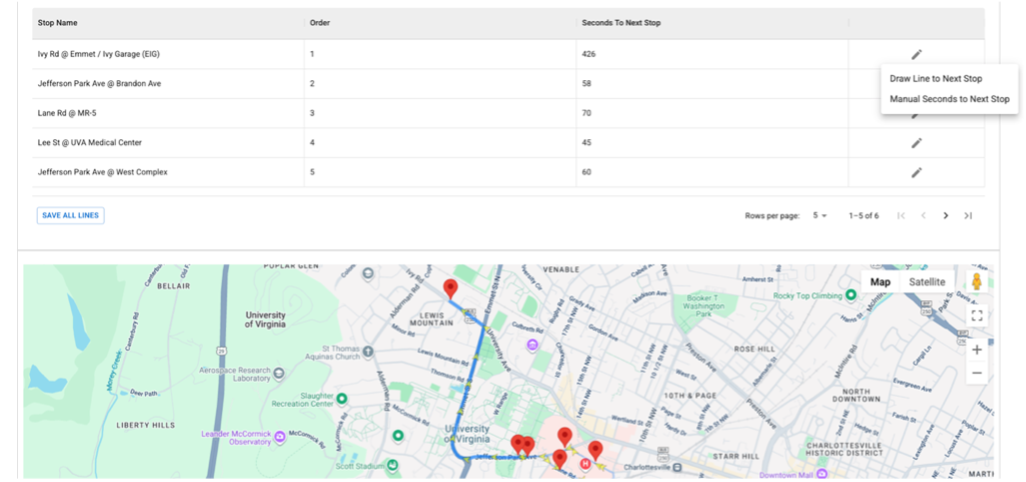
TransLoc’s Self-edit feature, integrated within the TransLoc Fixed Route (TLFR) platform, is designed to give transit agencies complete control over GTFS management, route editing, and scheduling—without relying on external support. This powerful enhancement enables agencies to make real-time updates, plan future changes confidently, and deliver better rider experiences. Self-edit supports seamless integration with other TransLoc solutions, ensuring operational efficiency and compliance with open data standards.
Table of Contents
Core Features of Self-Edit
Real-Time Route and Schedule Updates:
- Agencies can instantly update routes, stops, schedules, and Automatic Voice Announcements (AVA). This ensures riders receive accurate, real-time information during service changes or disruptions.
Future Planning and GTFS Compliance:
- Self-edit allows agencies to plan future changes with confidence while maintaining compliance through General Transit Feed Specification (GTFS) export. This guarantees smooth integration with trip-planning apps and open data platforms.
Improved Rider Communication:
- By enabling immediate updates, agencies can keep riders informed, reduce confusion, and enhance overall satisfaction with timely and accurate service information.
Integration and Scalability:
- Self-edit is designed to work seamlessly with TLFR and other TransLoc solutions. It is scalable to meet the evolving needs of transit agencies, supporting dynamic environments where flexibility and speed are critical.
Reporting & Analytics:
Self-edit empowers agencies to turn operational changes into actionable insights:
- Operational Reports: Track route updates and schedule changes.
- Compliance Reports: Export GTFS data for audits and integration.
- Custom Analytics: Use exported data for deeper analysis in BI tools.
Benefits for All Users
- For Managers: Gain autonomy, reduce costs, and improve service reliability.
- For Dispatchers: Respond quickly to disruptions with real-time updates.
- For Riders: Enjoy accurate, timely information for better trip planning.
Conclusion
Self-edit bridges the gap between technical capability and everyday usability. Its intuitive interface and robust features empower agencies to manage routes and schedules more effectively, ensuring efficiency, compliance, and rider satisfaction.
Ready to Learn More?
If you’re looking to enhance your fleet management with real-time tracking and powerful reporting, Vehicle Tracker is a solution worth considering. Its flexibility and ease of use make it suitable for organizations of all sizes and technical backgrounds. Contact our sales team.
Podcast
FAQ
What is TransLoc Self-edit?
Self-edit is a feature within the TransLoc Fixed Route (TLFR) platform that gives transit agencies full control over GTFS management, route editing, and scheduling without relying on external support.
Is Self-edit now available to all customers?
Yes, Self-edit is live and rolling out to all customers. Agencies can access it through their TransLoc dashboard.
What does TransLoc reimagine Self-edit do?
TransLoc reimagined Self-edit to provide agencies with greater autonomy, faster response times, and the ability to manage routes and schedules in real time.
What can transit agencies do with Self-edit?
Agencies can make real-time updates to routes, stops, schedules, and Automatic Voice Announcements (AVA), plan future changes, and export GTFS data seamlessly.
How does Self-edit improve rider experience?
By enabling agencies to update routes and stops instantly, riders receive accurate, real-time information, improving communication and reducing disruptions.
Does Self-edit support GTFS compliance?
Yes, Self-edit includes seamless GTFS export, ensuring compliance with open data standards and easy integration with trip planning apps.
Is Self-edit turned on by default?
No, Self-edit is not turned on by default. Agencies must contact their Support representative to enable the feature and receive training.
How can agencies get started with Self-edit?
Log in to the TransLoc dashboard and contact your Support representative for activation and training. Email support@transloc.com or call 1 (888) 959-3120 x3.
What support resources are available?
TransLoc offers hands-on training, setup guides, presentation decks, and video recordings. The Customer Care Team is available Monday–Friday, 8:00 AM–8:00 PM ET, with emergency support 24/7.